
TrafficVision for Gemini
Incidents, traffic data, charts, and maps in Google Gemini Enterprise. Free value-add for TrafficVision customers, with optional Gemini Agent Marketplace enablement.
Example interactions
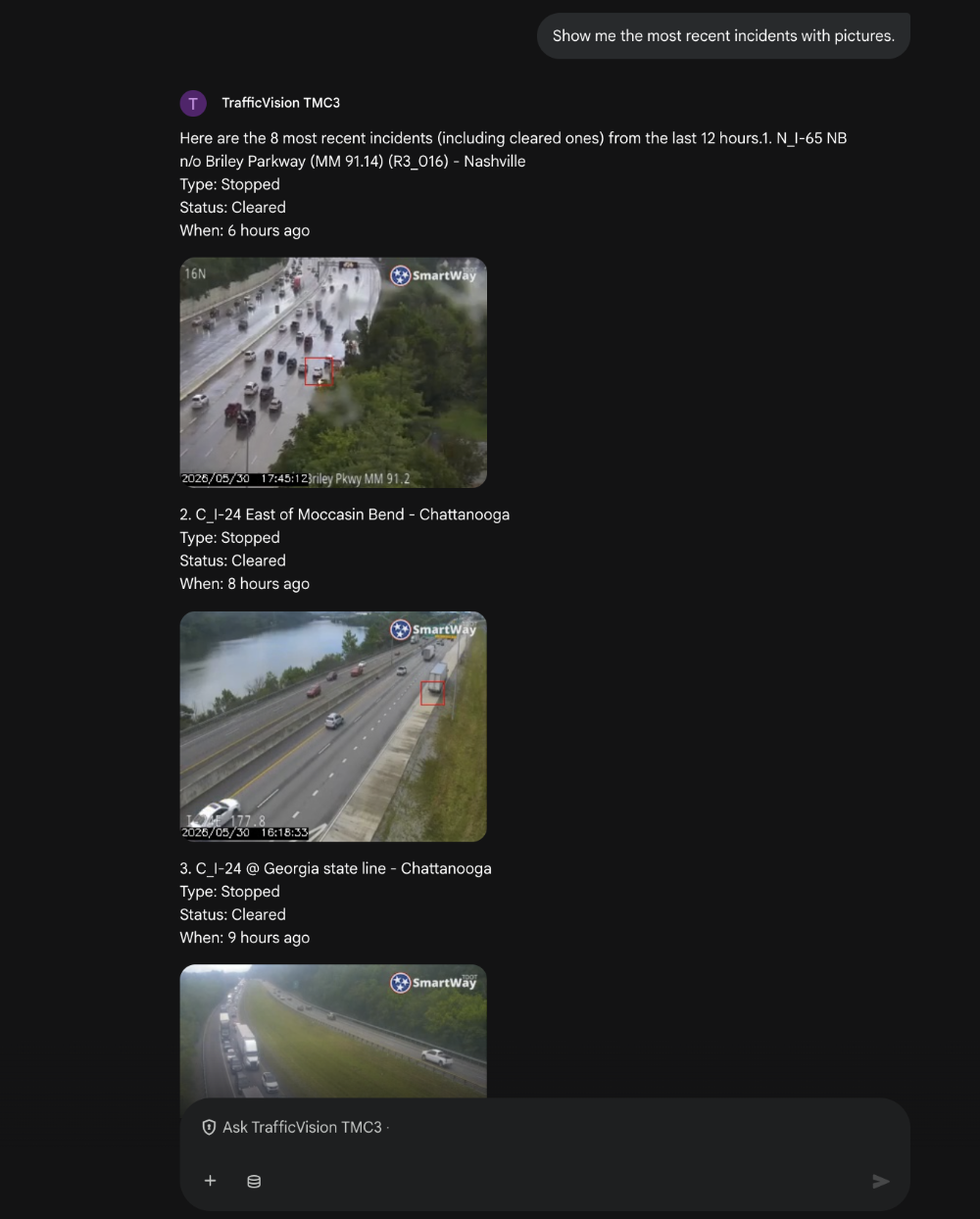
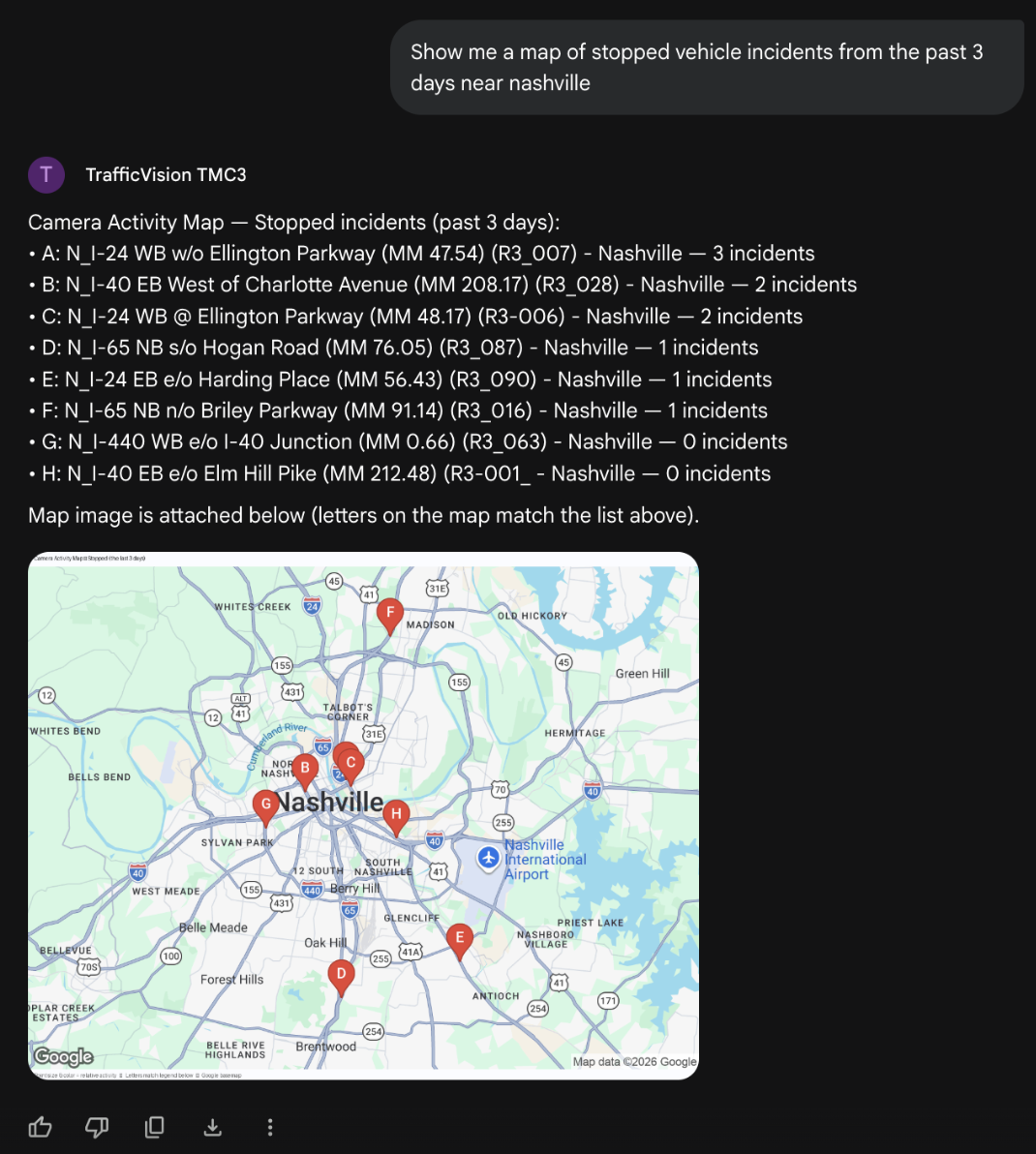
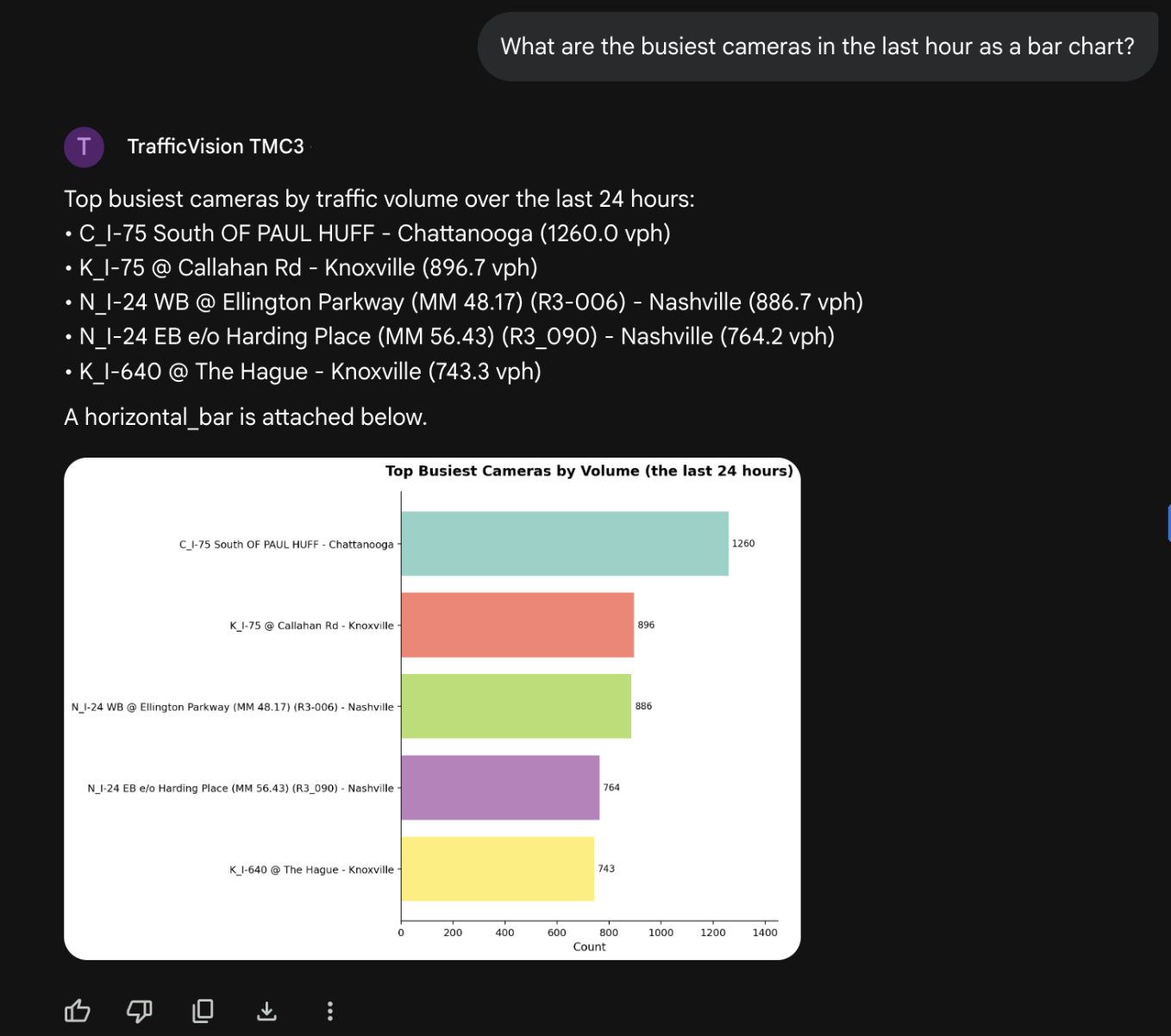
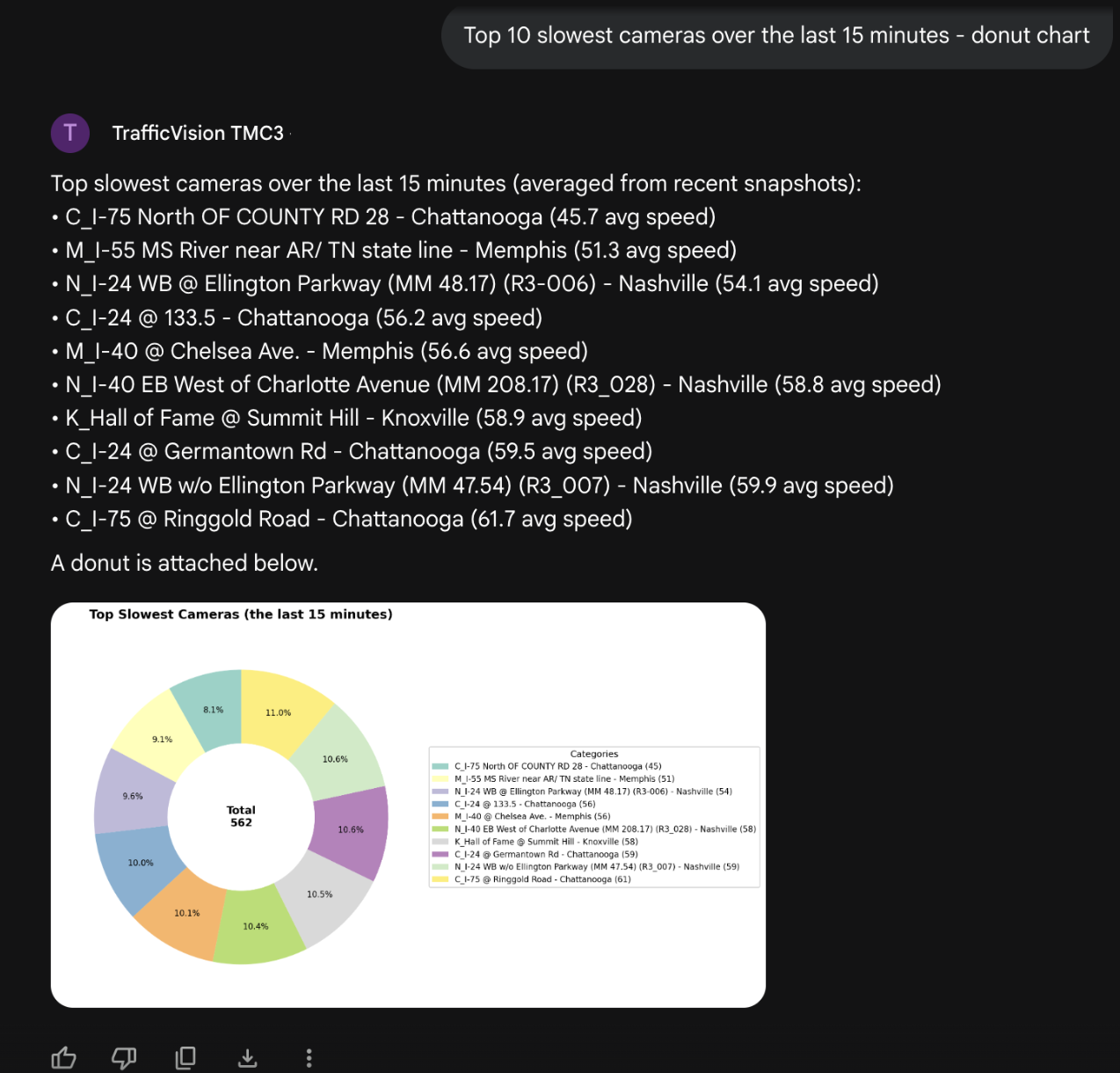
Screenshots from Gemini Enterprise using the TrafficVision TMC3 agent with live demo data. Prompts are free text. Responses include structured summaries plus attachments.
Typical prompts:
- “Show me the most recent incidents with pictures.”
- “Show me a map of stopped vehicle incidents from the past 3 days near Nashville.”
- “What are the busiest cameras in the last hour as a bar chart?”
- “Top 10 slowest cameras over the last 15 minutes - donut chart.”
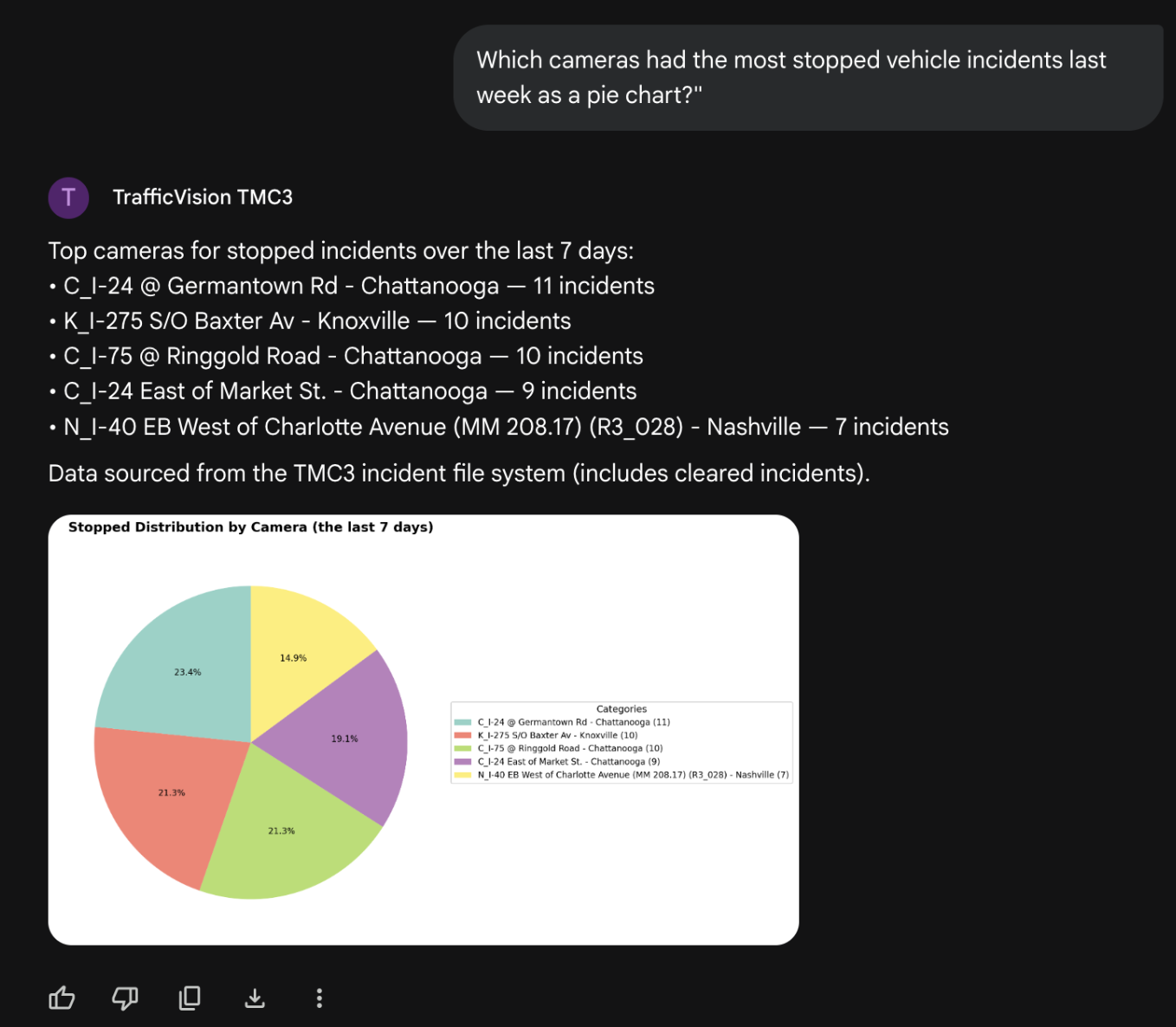
- “Which cameras had the most stopped vehicle incidents last week as a pie chart?”
Incidents with pictures
Camera activity map
Busiest cameras (bar chart)
Slowest cameras (donut chart)
Stopped incidents by camera (pie chart)
Overview
TrafficVision turns ITS cameras into intelligent sensors: incident detection, real-time traffic data, and useful historical analytics. The Gemini integration exposes those capabilities as an Agent2Agent (A2A) service so operators and analysts can work in natural language inside Gemini Enterprise.
- Adapter on the TMC3 host for low latency and data locality
- Agent Card describing skills and how to reach the adapter
- TrafficVision for Gemini (ADK root) for multi-turn assistant UX and Marketplace enablement
Two ways to connect
Both paths use the same adapter and the same TMC3 skills. What changes is how Gemini Enterprise enters the product.
Path A TrafficVision for Gemini
Users open TrafficVision for Gemini (ADK root). Gemini owns multi-turn conversation. The root calls the TMC3 adapter when live traffic data is needed.
- Natural multi-turn assistant experience
- Primary shape for Gemini Agent Marketplace enablement
- Root can be hosted by TrafficVision, or later in the customer environment
Path B TrafficVision TMC3 (direct)
Register the TrafficVision TMC3 Agent Card in Gemini Enterprise as a custom A2A agent. Gemini talks to the adapter for each turn.
- Simple free value-add per site
- Strong for skill validation and direct card registration
- Does not require an ADK root
TrafficVision for Gemini (Path A) vs TrafficVision TMC3 direct (Path B).
Architecture
A thin A2A adapter sits next to TMC3 on the site (customer server or TrafficVision-managed instance). Skills, charts, maps, and media stay in the adapter. Gemini can reach that adapter in either of two ways.
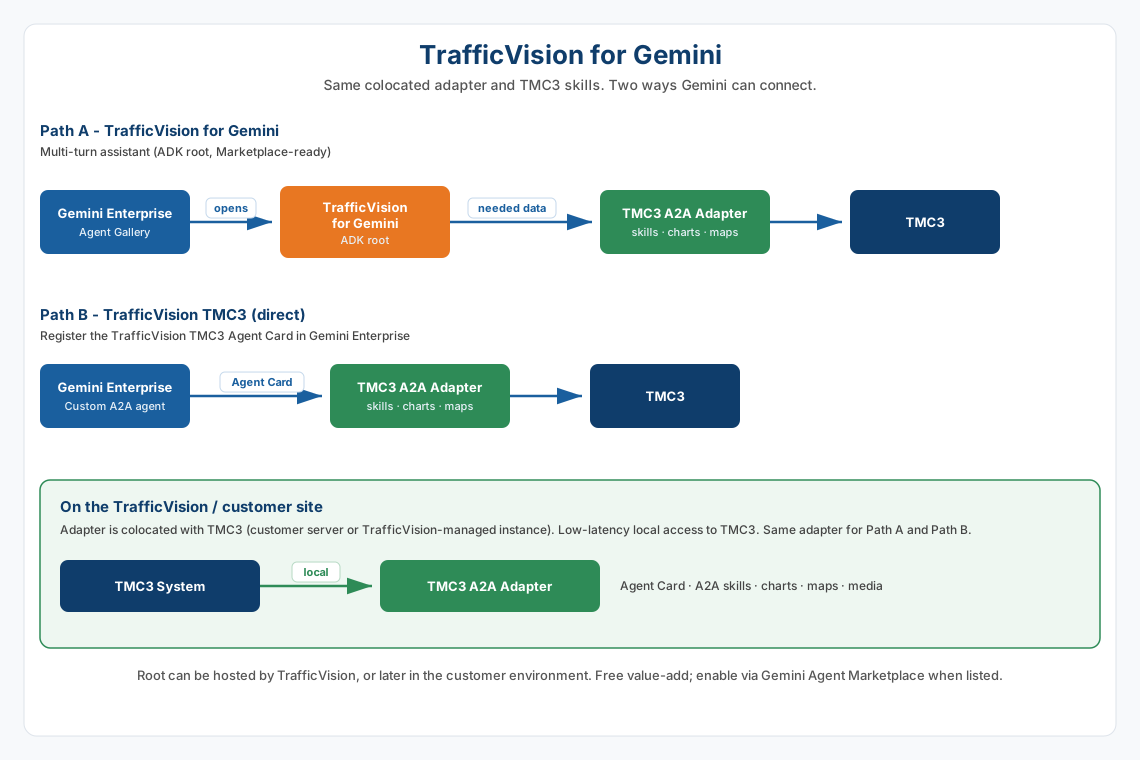
The root does not reimplement skills, charts, or maps. It can be hosted by TrafficVision, or later in the customer environment.
Marketplace enablement
The Gemini Agent Marketplace is a free enablement path for organizations that want TrafficVision for Gemini. Enabling the agent in Marketplace / Gemini Enterprise makes the product available in the Agent Gallery. Connecting the site’s TrafficVision adapter is a separate configuration step (partner portal or TrafficVision ops).
| Step | Who | What happens |
|---|---|---|
| 1. Enable the agent | Customer admin | Marketplace / GE enablement creates the entitlement and product access |
| 2. Add to Gemini Enterprise | GE admin | TrafficVision for Gemini appears in the Agent Gallery |
| 3. Connect TrafficVision | Customer or TrafficVision | Adapter location and credentials are configured for that site |
| 4. Validate | Automated / ops | Confirm Agent Card and a basic A2A health check |
| 5. Use | End users | Open TrafficVision for Gemini from Agents and chat in natural language |
Authentication
Several hops are involved. Marketplace OAuth and site credentials solve different problems.
| Layer | Hop | Typical mechanism |
|---|---|---|
| 1. User identity | Person → Gemini Enterprise | Google / Workspace account |
| 2. App OAuth (Marketplace) | GE → TrafficVision product (root / listed agent) | OAuth 2.0 Authorization Code grant (app OAuth / DCR as required by Marketplace) |
| 3. Site credential | Root → customer A2A adapter | Per-site API key (for example X-API-Key) or equivalent |
| 4. TMC3 | Adapter → TMC3 | Existing on-host TMC3 credentials |
Agent card and listing
TrafficVision for Gemini (Path A)
At a high level, the Marketplace listing describes one product (TrafficVision for Gemini), not every site’s adapter URL. Site connection details are configured after enablement, not baked into the listing as per-customer URLs.
TrafficVision TMC3 (Path B)
Each adapter publishes an Agent Card (for example under
/.well-known/agent-card.json) that lists skills, examples, and auth schemes.
That card is what Gemini uses when registering the direct TrafficVision TMC3
agent.
Getting started
TrafficVision for Gemini (Path A)
- Enable TrafficVision for Gemini via Marketplace / GE (when the listing is live).
- Add the agent to the Gemini Enterprise app and share it with users.
- Connect the site adapter (portal or TrafficVision-assisted setup).
- Open TrafficVision for Gemini from Agents and chat in natural language.
TrafficVision TMC3 (Path B)
- Deploy the TMC3 A2A adapter next to the customer TMC3.
- Publish the Agent Card from the adapter.
- In Gemini Enterprise: Agents → Add custom A2A agent using the card (gallery name: TrafficVision TMC3).
- Open the agent from the gallery and try the example prompts above.