Email Rules
Email Rules
Email rules are used in conjunction with Recipient Groups and Camera Groups to send Email Notifications.
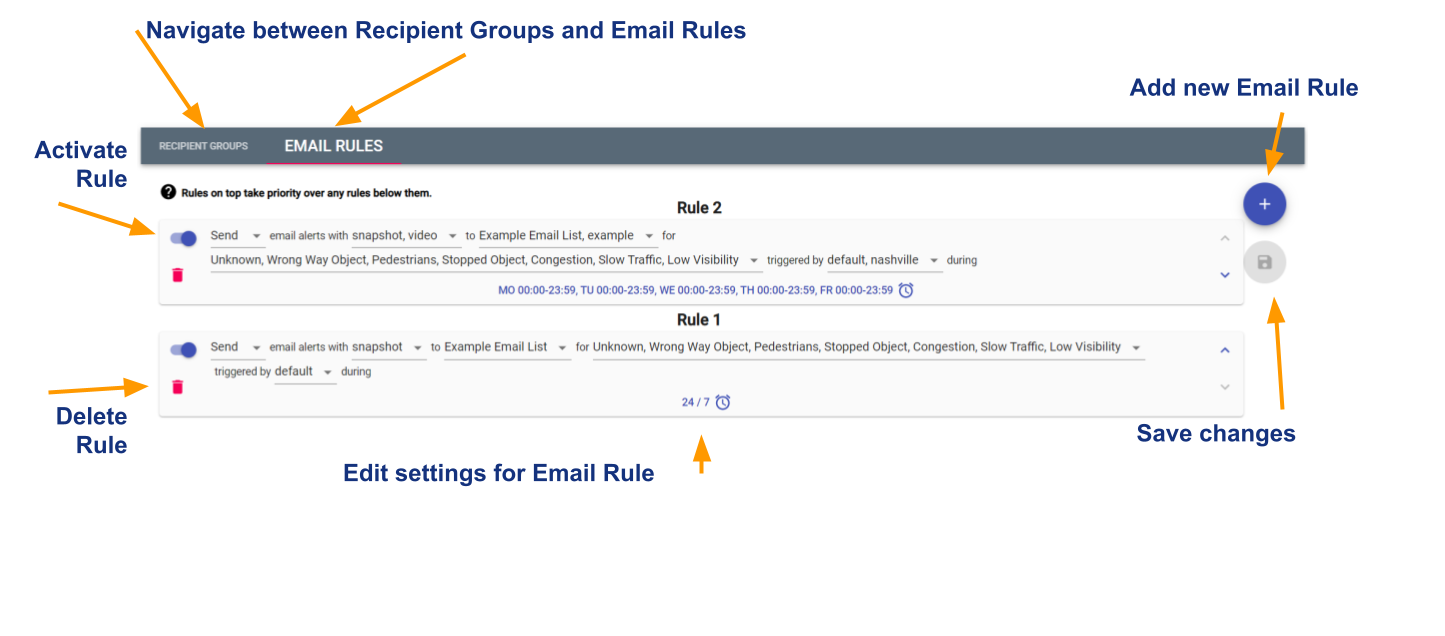
Creating an Email Rule:
- Select the + icon on the top right of the window
- A new rule will appear at the top of the Email Rules list
- Rules on top take priority over any rules below them
Editing an Email Rule:
- Activate a rule by selecting the slider on the left side of the rule. If on the right the rule is active, if on the left the rule is not active.
- Use the dropdown menues to set the Email Rule
- Send/Block: specifies if the rule will either send or block email notifications
- Snapshot/Video specifies if the rule will contain a snapshot, video, both, or neither
- to specifies which Recipient Groups the rule applies to
- for specifies the incident types the rule applies to
- triggered by specifies the Camera Groups the rule applies to
- during specifies the times that the rule will be in effect
In the above example Rule 2 (the rule on top) specifies to SEND email alerts with SNAPSHOT, VIDEO to EXAMPLE EMAIL LIST, EXAMPLE for UNKNOWN, WRONG WAY OBJECT, PEDESTRIAN, STOPPED OBJECT, CONGESTION, SLOW TRAFFIC, LOW VISIBILITY triggered by DEFAULT, NASHBILLE, during MONDAY-FRIDAY 12:00AM - 11:59PM
Rule 1 (the rule on bottom) specifies to SEND email alerts with SNAPSHOT to EXAMPLE EMAIL LIST for UNKNOWN, WRONG WAY OBJECT, PEDESTRIAN, STOPPED OBJECT, CONGESTION, SLOW TRAFFIC, LOW VISIBILITY triggered by DEFAULT during 24/7
In this scenario, from MONDAY - FRIDAY the Recipient Groups EXAMPLE EMAIL LIST and EXAMPLE (two seperate groups) will recieve Email Notifications for all incident types triggered on cameras in the Camera Groups DEFAULT and NASHVILLE that include a SNAPSHOT and VIDEO. On SATURDAY and SUNDAY just the Recipient Groups EXAMPLE EMAIL LIST will recieve Email NOtifications for all incidents triggered by cameras just in Camera Group DEFAULT that inclues just a SNAPSHOT.
Deleting a rule:
- Select the DELETE icon on the left of the rule
- Select the SAVE icon on the right side of the pane